Showing posts with label post production. Show all posts

Friday, July 24, 2020

Pro Tip#8 - Networking


Film schools never teach you marketing & networking and these are two of the most important things to learn in this industry. A lot of very good talent goes to waste as they lack these skills.

It does not matter if you're a director or a producer or an intern that's just starting out. Being a friendly person to work with will not only make your employers come back to you time and time again but those same people would also recommend you to others. Who wouldn't want to work with a person who is cheerful even at the most stressed-out times? 

Make friends with all, from the runner on your set to the client that is present. You never know when someone climbs the ladder or changes their path. An assistant from today could be your potential client tomorrow. Of course, you will come across people you don't like and never want to work with, even in such situations be polite and try and move out of the situation or job or project as quietly and quickly as possible. Never burn bridges with anyone. 
 
Besides the workplace how do you go about networking? start simple, by adding your peers on social media. See other people's work, say nice things about it if you like it. As and when possible make friends with others beyond your office network like when you are in studios and there are others around. Post-production studios are a great way to meet people from different organizations. Go for parties and events like award functions or film festivals, these are great places to build your network quickly if your good at it. Invite your potential clients, agencies out to drinks, or dinner. A post wrap party is always a nice time to bond.

But in your effort of networking, do not force your self on people by constantly messaging and chatting. Give people their space too. If it's meant to be you will become friends with that person. Don't keep asking people for work, see Tips When Applying For Work


Don't forget to leave your thoughts, tips, and comments below


Wednesday, May 27, 2020

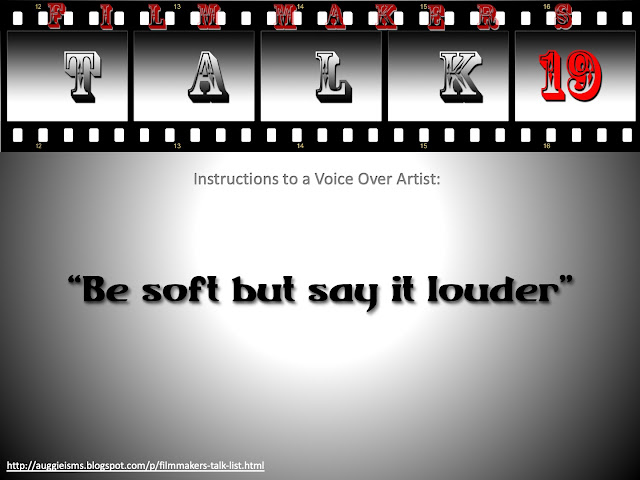
Filmmakers Talk 19 - Voice Over Instructions


If you have heard any funny comments in the studio post it in the comments below and it might just make the Film-Makers Talk List.


Previous Talks:


Tuesday, July 26, 2016

Filmmakers Talk 16 - Filmmaking Dictionary: Deadline


How many times has this happened to you on projects where the deadline has come and gone but you are still making changes.. leave a comment below to let me know if this happens to you..


Post your funny comments that you may have come across and it just might make it to the Film-Makers Talk List


Some past Talks:


*This is a work of fiction. Names, characters, quotes, places and incidents mentioned, either are products of the author’s imagination or are used fictitiously. Any resemblance to actual events or locales or persons, living or dead, from the film industry or outside the film industry is entirely coincidental.


For more interesting articles click on Auggielicious Index to see the entire list.
Like / Follow on the Facebook page Auggielicious for information, latest news, job posts etc..


Tuesday, November 24, 2015

How to cut up a video into unequal proportions in After Effects

Recently I was asked to output a video for a large screen projection into 4 unequal parts. Why would anyone need this you may ask? Well these are used for large LED screens for rock / music concerts, auto car shows, trade show etc. Below is the 10 step easy route I used in After Effects to get this done.

The task given was to convert a HD video into 4096 x 1408 size and then cut it up into 4 parts, now if it was a equal division it would be a easier task but have a look at pic 1 below and it should explain why this is complicated process.

Pic 1: Screen Requirements


Step 1: Prepare the video.


Luckily for me, that was a call the client had to take, and they went with crop the top and bottom option. Whatever is the size of the full final resolution, is the size you should prepare your master video and export it. If your master video is only for the giant screen it is ideal that you prepare your output in the full size right from the beginning rather than scale it up later. 


Pic 2: HD image without crop


Pic 3: HD image scaled up to fill up the width

TIP - Prepare the video in the full size required, check if all your shots fit within the screen dimensions and all your supers and effects are within the screen's display. HD does not blow up to this proportion so the choice was 

1. Keep the full HD image but have blank space on either side Pic 2 OR 
2. Fill up the screen and crop top and bottom of the image. Pic 3.

Once you have adjusted your super's and effects and whatever you can do to keep inside the visual area, you export the video ideally in the uncompressed format in the size requested, in this case 4096 x 1408.

You will probably say that you could do the same thing by just applying the scale on the image and then using the video, but I have noticed that sometimes after cropping you may have a one or two pixel problem which will shift your image and that shows up even more on a giant screen. So its safer to use a video where you are only applying the crop and no other effects on it while doing this process.


Step 2: Import the video in After Effects.


Import your uncompressed video, or best resolution video into the project.


Step 3: Create 4 compositions. 


Create 4 compositions, give the names V1 – V4 corresponding the 4 screens, size of each screen to be as requested. (See pic 1) 

Use different bright background colours to help identify each one quicker, also if you have a bright solid colour it will help to identify if there is a gap during the crop process, even if it is for one pixel at the edges, this helps avoid any mistakes.

Keep the pixel ratio to square.

In this case the V1 and V2 will be 2048x1024. (You get that by 1408 - 384 on the height.) and V3 and V4 will be 2048 x 384 (see pic 1 & 4)


Pic 4: V1 to V4 composition settings


Step 4: Place the video in each composition.


Drag your full resolution video in each of the compositions.


Step 5: Re-set the anchor points.


Re-set the anchor point in all compositions to 0,0 that should take the anchor to the top left corner of the image (See pic 5 & 6)


Pic 5: Reset position for V1

Step 6: Re-set the position in each composition. 

Re-set your image positions so that the image occupies the different corner in each composition 

V1 will be 0,0 that takes the entire image to the top left corner. (See Pic 5)
V2 will be -2048, 0 (which is minus half of the total width, since the width is divided into equal parts)
V3 will be 0,-1024 (which is minus top part of the height
V4 will be -2048, -1024 (which is minus half width and top part of the height) [See pic 6]


Pic 6: Reset position for V4
The reason to reset your anchor points and positions is so that the math of dividing the screens is easier and quicker to check, you could do this without resetting any of the points but that would mean that you would need to calculate the difference from the centre of the image to the various corners of the screen required, which trust me is a whole lot of math to get right.


Step 7: Export the 4 cropped videos.

Render out V1 – V4 in the same setting as imports (uncompressed), before you render out please check that the video has been positioned in exact corners of every composition, if the video is not in position you would see the background colour even if its off by 1 pixel. If its off you would need to go back and check your numbers all along the process right from your master export.

Pic 7: 4 parts of the cropped video 

Step 8: Checking the 4 cut videos. 

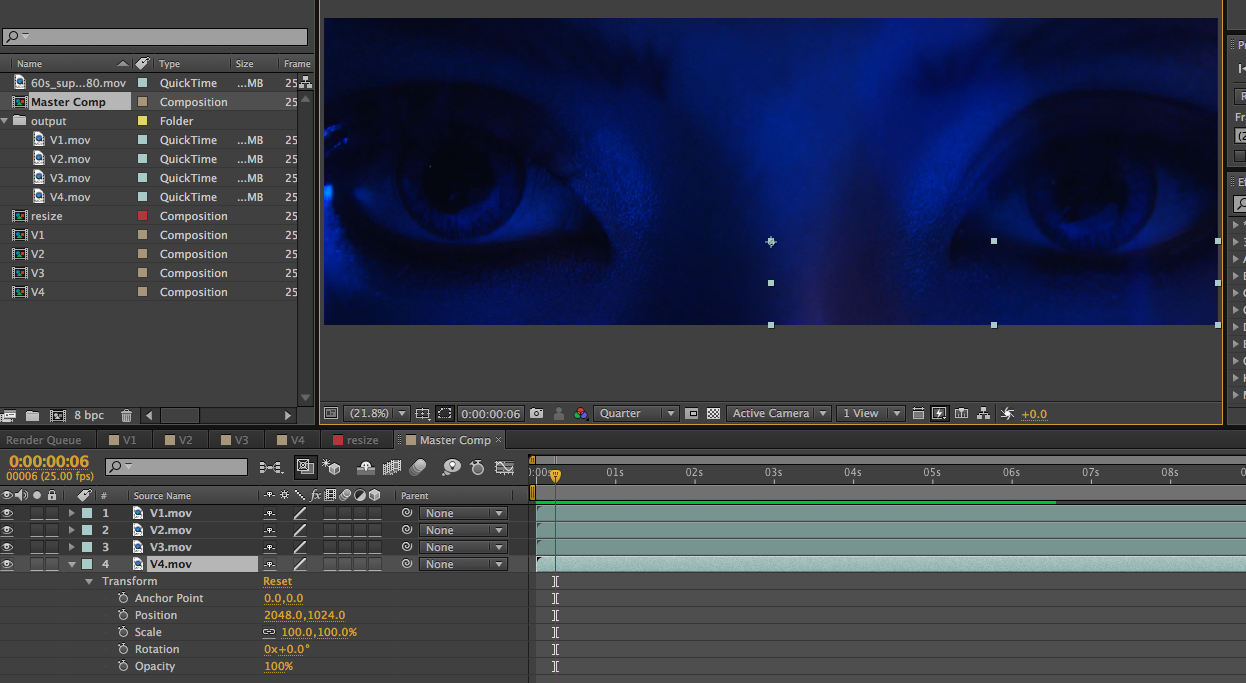
To check if the video has been cut fine, make a master comp of the full size (4096 x 1408 in this case) Import all the cut video exports (V1 - V4) into the master comp, re-set all the anchor points to 0,0 and re-set all the positions for V1 - V4 but without the negative

In this case it will be
V1 will be 0,0
V2 will be 2048,0
V3 will be 0,1024
V4 will be 2048,1024 (See pic 8)


Pic 8: Master comp 


All the videos should align correctly to give a complete picture, even if one pixel is off you will see the dividing line between the 2 images, play the video to check if there are any problems. If there is a problem go back and check all the numbers for each and every export and see if there is a problem there.

Step 9: Convert the video format.


Now you can convert the 4 cropped of videos into what ever format and compression you need, like most large screens require either wmv or mov as outputs. Don't forget audio file needs to be given separately.

Step 10: Check on the giant screen.


Finally if possible check the film on the giant screen to know that it all worked out fine.


For more interesting articles click on Auggielicious Index to see the list, and to be in touch hit Like / Follow on the blog button on the right hand side or hit Like on the Facebook page Auggielicious for information, latest news and events beyond the blog..


Wednesday, September 23, 2015

Filmmakers Talk 13 - Agency Comments

Most recently came across this agency that asked me to zoom into the shot but without loosing any information.... Please help if anyone know how to do this..


Post your funny comments that you may have come across and it just might make it to the Film-Makers Talk List


Some past Talks:


*This is a work of fiction. Names, characters, quotes, places and incidents mentioned, either are products of the author’s imagination or are used fictitiously. Any resemblance to actual events or locales or persons, living or dead, from the film industry or outside the film industry is entirely coincidental.


For more interesting articles click on Auggielicious Index to see the entire list.
Like / Follow on the Facebook page Auggielicious for information, latest news, job posts etc..


Thursday, April 30, 2015

Filmmakers Talk #11 - Fix in Post

Of course you have heard this..


Post your funny comments that you may have come across and it just might make it to the Film-Makers Talk List


Some past Talks:


*This is a work of fiction. Names, characters, quotes, places and incidents mentioned, either are products of the author’s imagination or are used fictitiously. Any resemblance to actual events or locales or persons, living or dead, from the film industry or outside the film industry is entirely coincidental.


For more interesting articles click on Auggielicious Index to see the entire list.
Like / Follow on the Facebook page Auggielicious for information, latest news, job posts etc..

Tuesday, April 14, 2015

Filmmakers Talk #10 - Producer to Client

It's not new to hear Clients asking for the edits to be presented at their office, while there is no problem with that except when they expect changes to be done right away.. small changes like "make the super bigger" and "keep this shot longer".. problem is there are further similar changes to these changes..

This one is dedicated to all post producers who would love to tell the clients when they don't want to come to the studio but ask for changes immediately...


...just come to the studio


Post your funny comments that you may have come across and it just might make it to the Film-Makers Talk List


Some past Talks:


*This is a work of fiction. Names, characters, quotes, places and incidents mentioned, either are products of the author’s imagination or are used fictitiously. Any resemblance to actual events or locales or persons, living or dead, from the film industry or outside the film industry is entirely coincidental.


For more interesting articles click on Auggielicious Index to see the entire list.
Like / Follow on the Facebook page Auggielicious for information, latest news, job posts etc..


Tuesday, March 3, 2015

Filmmakers Talk #9 - Post Producer to Agency

Been hearing this over the last few projects, where while everything else gets delayed the deadline for delivery does not shift, on one such occasion the Agency said "Since we have lesser time for post, how about we do the 15 sec cut down first and do the Master 30 sec later.." its a very straight forward answer to be given to such a question..


Of course, this answer applies only to advertising...

Post your funny comments that you may have come across and it just might make it to the Film-Makers Talk List


Some past Talks:


*This is a work of fiction. Names, characters, quotes, places and incidents mentioned, either are products of the author’s imagination or are used fictitiously. Any resemblance to actual events or locales or persons, living or dead, from the film industry or outside the film industry is entirely coincidental.


For more interesting articles click on Auggielicious Index to see the entire list.
Like / Follow on the Facebook page Auggielicious for information, latest news, job posts etc..


Monday, February 2, 2015

Production Time Sheet / Job Sheet Template - FREE

For any production company doing many projects at the same time, one of the main complications is getting a comprehensive report of time spent on different jobs by different people and therefore the money spent on that project. Also producers would like to do a quick comparison between projects to see which one has cost more than estimated. So while there may be a lot of paid apps that do this for you not always do you have the budget to buy these or you are not sure if that app is something that would suit your needs. At the place I currently work I was thrown this same challenge, so I worked out on Microsoft Excel a simple table that gives me all the information I need. (Get your FREE TEMPLATE of this, details below)

Image 1: The Master Table 

The Challenge

So there are multiple things that I had to consider when making this sheet, 
# There will be multiple projects being worked upon at the same time.
# Within each project there are different jobs to be done - Offline, Online, Grade etc
# The job / role of each person has to be considered, lots of times the same person performs different operations like sometimes as an Asst Editor and sometimes Editor
# The reason for knowing the different roles within the job would be because rates would cost different for different roles eg - transcoding rates would be different from a offline rate 

So the main challenge was how to compress all this information into one table so that I do not have to keep adjusting data to look at various combinations. One look at Image 1 & 2 tells you that I broke up the table with the jobs on one side and each person working under each project on the other side which includes sub categories. In the sub category each persons individual contribution gets mentioned. All the data on this sheet gets automatically updated when the details are filled in.


Image 2: Master table expanded

The Working

So the Master table I designed gives me all the combination of information I need, the drop down options lets me filter the information, so I can choose from which months or month I want to see information of, or I can choose to hide some projects. Under each project people who worked on it get automatically added when they clock in hours and the role that they played also gets updated as I fill up the information on the next sheet (Detailed Report - Image 3)


Here on this sheet information is broken up under the various categories shown in Image 3, by doing this the Master page gets all the information it needs as a break up to automatically combine it. One problem with this is if you do not type the same exact words in excel (exact spelling and even spaces between make a difference) the sheet will produce multiple lines which will confuse you when reading the data, eg if I type Sound  & sounds the sheet will take them as 2 separate lines.  In order to make sure that the sheet does not do this and produce multiple lines under the same person for the same job there is a 3rd sheet created Look Up List (Image 4).


Image 3: Detailed Report

So certain categories which would get repeated a lot are locked in on this sheet (Image 4) and any data under these topics cannot be written any differently on the detailed sheet, Image 5A & 5B show how only the data written on this sheet can be selected and nothing else. Of course I can keep adding data to this sheet by typing just under the last row and that automatically shows up under the options on the details page. All the titles under job in this case automatically create a new column on the master page and therefore it is best to limit this to as less as possible.

Image 4: Look Up List

The dropdown list helps keep the Master Sheet clean but also helps to limit mistakes if data is being entered by multiple people or at different times.

Image 5A: Drop down options

Image 5B: Error message

Another advantage of this Master Time Sheet is you can just keep on adding data and as time passes just keep hiding the months on the detailed report which will not affect the master page, that way you can have the projects to the whole year on the master page.


To avoid too many mistakes it is always best if only one person fills up this sheet and so I get each individual to fill up job sheets and ask them to fill it up project wise (Image 6), initially I had got the employees to fill up all data on one sheet and had one more column for project but then it was easier for me to see a persons day by selecting their name on the detailed report and it will give me day wise data of that individual. So getting a separate sheet per person on each project helps to have a quick look at each persons contribution to the project, though that too can be looked at using the Master page.


Image 6: Individual Job Sheet


It would be best if I get these sheets as typed information that way I can just copy the data and paste on the Master sheet. I do insist that as much information is given to me on this sheet so in case when the Producers / Bosses are looking at the data and feel that too many hours were spent on a certain job, a quick look at these sheets will let me know why and where these hours were spent and thats another advantage of individual project job sheets. Of course that leaves me to interpret each persons role based on the information given in these sheets.

Finally I could also add a column for rates and that way all data would come with the amount of money spent alongside the hours spent, but since I keep this information open for all in the office to access it is best to leave the money calculation separately.


For those who are interested in getting a copy of this hit Like / Follow on the blog button on the right hand side or you can click Like on the Facebook page Auggielicious and leave your email id in the comments and I will send you FREE TEMPLATE copy of this

Wednesday, August 14, 2013

Filmmakers Talk #3 - The Editor

If you have never done "post-production" you would not have heard this...


Post your funny comments that you may have come across and it just might make it to the Film-Makers Talk List


Some past Talks:


*This is a work of fiction. Names, characters, quotes, places and incidents mentioned, either are products of the author’s imagination or are used fictitiously. Any resemblance to actual events or locales or persons, living or dead, from the film industry or outside the film industry is entirely coincidental.


For more interesting articles click on Auggielicious Index to see the entire list.
Like / Follow on the Facebook page Auggielicious for information, latest news, job posts etc..


Friday, September 7, 2012

Careers in filmmaking - Post Production

"We wants it, we needs it. Must have the precious. They stole it from us. Sneaky little hobbitses. Wicked, tricksy, false!" - Gollum, Lord of the Rings: The Two Towers. (2002)


Career Choice – Post Production


Pre-Production not your cup of tea, so here are some of the things you could do in post-production.

POST - PRODUCTION


Post Production Supervisor Key link in coordinating the entire process from after shoot till the project ends. Does not need to know how to operate the various systems, but some amount of technical knowledge does help. It could be freelance or inhouse with either a production house or even a Posthouse.

Offline Editor – the person who cuts the rushes to a viewable sequence in accordance with the director’s vision. It could be freelance or associated with a post-production studio.

Assistant Offline Editor – Assists the editor, main job role would be digitising the rushes, sorting it, sound syncing, making subclips  etc. Usually a trainee who wants to become an editor.

Online Editor – works on high resolution systems, not so much for cutting the film but used for compositing, tittling, cleanups etc. mostly is associated with a studio very rarely do u find freelance online editors. 

Colourist – sets the colour tone to the film. Is always associated with a Post Production House.

Machine Room Technician –  works in the machine room of a studio, is responsible for connections from offline, online rooms to recorders, players, hard disks etc.

Booking Manager – the person who manages the booking to all the rooms present at the post house, job done by more than one person at bigger studios.

Studio Manager – handles all the client and editor related complaints or suggestions and making sure that work flows smoothly. Mainly like a P.R. role.

Visual effects supervisor  (Vfx) – Usually the head of the graphics department, or the person who is heading the project, could also be the expert on that particular job. Knows how to work the software mostly.

3D Graphic’s – person or a team of people who work on 3D graphic software's.

2D Grpahic’s – person or a team that works on 2D graphics, sometimes the person knows both 2D and 3D. 

Music Director – the person who controls the direction of the music on all levels, not necessarily the composer of the piece.

Composer – the person who could use both instruments and software's to compose a music track, background score.  

Arranger – has to make sure that every aspect of the music piece is well harmonized. Could work on an original or an existing piece of music. Sometimes the music director or the composer also plays this role.

Sound Engineer – records voices at dubs, lays tracks from the music director mixes it all down to a proper balance that is required.

Foley Artist - Creates sound effects that cant be captured during film making, sounds like footsteps, clothes rustling, door closing etc. its any sound that could be part of the scene.

Singer – Sings either the main voice or in a chorus.

Voice Over Artist (VO) – the person who dubs the voice either in place of the actor or the voice for the product window like in advertising. Short forms are MVO and FVO for males and females respectively.

Language Co-ordinator for VO – a person who co-ordinates and arranges for VO artists in different languages according to the requirement at the recording studios. Sometimes also arranges for a language supervisor.

Language Supervisor – Someone who supervises the language pronunciation, and also makes necessary to the translations if necessary. Sometimes the language scriptwriter also doubles up as the supervisor.


Of course, most of these titles have assistants to them. There are more jobs to post-production, like a Promo Producer in a Television network or Publicist in a feature film. Still can't decide what to do then maybe its journalism, advertising agency, channel, etc is where you need to be.


Auggieism:- What do you say when Auggie is overeating?
Ans:- Hoggie..


For more interesting articles click on Auggielicious Index to see the entire list.
Like / Follow on the Facebook page Auggielicious for information, latest news, job posts etc..