Showing posts with label advertising. Show all posts

Friday, July 24, 2020

Pro Tip#8 - Networking


Film schools never teach you marketing & networking and these are two of the most important things to learn in this industry. A lot of very good talent goes to waste as they lack these skills.

It does not matter if you're a director or a producer or an intern that's just starting out. Being a friendly person to work with will not only make your employers come back to you time and time again but those same people would also recommend you to others. Who wouldn't want to work with a person who is cheerful even at the most stressed-out times? 

Make friends with all, from the runner on your set to the client that is present. You never know when someone climbs the ladder or changes their path. An assistant from today could be your potential client tomorrow. Of course, you will come across people you don't like and never want to work with, even in such situations be polite and try and move out of the situation or job or project as quietly and quickly as possible. Never burn bridges with anyone. 
 
Besides the workplace how do you go about networking? start simple, by adding your peers on social media. See other people's work, say nice things about it if you like it. As and when possible make friends with others beyond your office network like when you are in studios and there are others around. Post-production studios are a great way to meet people from different organizations. Go for parties and events like award functions or film festivals, these are great places to build your network quickly if your good at it. Invite your potential clients, agencies out to drinks, or dinner. A post wrap party is always a nice time to bond.

But in your effort of networking, do not force your self on people by constantly messaging and chatting. Give people their space too. If it's meant to be you will become friends with that person. Don't keep asking people for work, see Tips When Applying For Work


Don't forget to leave your thoughts, tips, and comments below


Wednesday, May 27, 2020

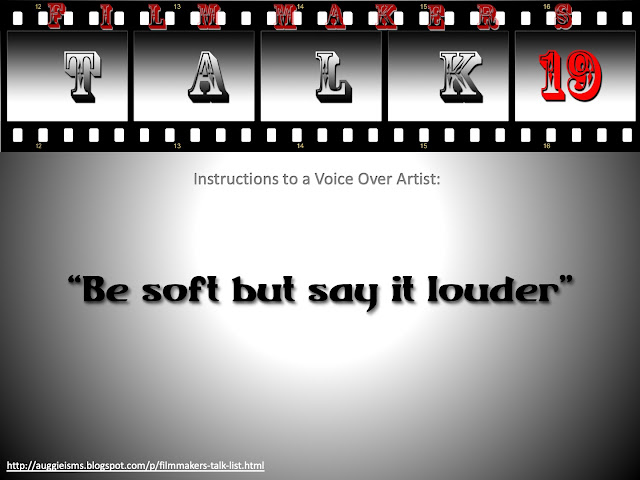
Filmmakers Talk 19 - Voice Over Instructions


If you have heard any funny comments in the studio post it in the comments below and it might just make the Film-Makers Talk List.


Previous Talks:


Thursday, April 2, 2020

Pro Tip #4 - When sending your resume


Yes sending your resume to many people is a very good thing but you should take the trouble to make each email personal.

Never and I mean NEVER CC people from different companies. The only time to use CC would be when its different people in the same company.


Check out more professional filmmaking tips here

For more tips and details read

Monday, March 30, 2020

Pro Tip #3 - When sending your resume


Adress the person with their name and if you don't know that or the gender use the sir/madam option.

Even if the person you are sending your cv to is your childhood friend keep the email formal since that email may be forwarded to others in their office.


Check out more professional filmmaking tips here

For more tips and details read

Pro Tip #4 - When sending your resume

Pro Tip #2 - When applying for work


Just because you have someone's phone no does not give you the right to call or text someone beyond working hours unless it is stated "URGENT call anytime" by the person. 

When following up on emails be polite and check-in if the person has received your email and if they have arrived at any conclusion.


Check out more professional filmmaking tips here

For more tips and details read


Friday, August 9, 2019

I am coming back home


Watch it on youtube if possible.

A song that was sung by me many years ago for a commercial but was not used back then. Finally added visuals shot by me over a period of time to it and made send to release it the day I moved back home after being out of the country for close to 5 years

CREDITS:
Music Composer: Rupert
Sound Engineer: Micu
Singer: Auggie


Thursday, February 8, 2018

Tips on how to build your showreel

The biggest problem as a beginner is how does one build a showreel when no one is willing to give you work without an existing showreel. Read on to find some of the methods that you can try to build up your showreel and this applies not just to Directors but to everyone in this industry including editors, musicians, sound engineers, cinematographers etc.


Before I go ahead and give you the various options that you can try to build your reel, I first hope you have some idea of what you want to be and have assisted in that role for at least a few projects. For example, if you want to be a director, you should have assisted in at least 30 - 40 projects if they are commercials, or 4 - 8 mimimum features films or documentaries if that's the direction you want to take, same if you want to be an editor or a sound engineer etc. It's extremely rare that someone comes out of a film school and straightaway gets into a senior role, for almost all of the rest, the first experience you need is that of an assistant to the role you desire or at least have worked in the industry long enough to know what the role is about.

Here are some TIPS to build your Showreel:-   


1. Do your own work

2. Enter contests

3. Associate with an established professional

4. Join an Agency      

5. Get connected

1. Do your own work:-


If you have just started out or your career is stuck and not moving to the next level, having your own work is the best way to build a reel. Your own work could be stories, documentaries, short films or even mock ad films written, directed, produced, edited by you or a team, for e.g. if you are coming from a film school or a course you would already know a few people who are in the same boat as you and the best way would be to get together with them that way every one of you are making something to put on each of your reels. Of course, do not forget to try and get some good work while still in the film school, this helps cause you would most likely have all the tools at your disposal and that would mean at least one film on the reel.

Doing your own work could mean investing not just your time but your money as well in making your project. Remember usually free work comes at the cost of quality.

2. Enter contests:-


If you are not as inspired to come up with your own ideas the next best way to build your reel is to enter into contests (click on the link to see a few that I have listed, to begin with, Contest LINKS)
There are lot many more websites and groups that run contests, this applies to advertising as well as films. These contests or film festivals usually have guidelines and deadlines which help push you to finish your work which otherwise could take forever.

Hopefully, by this time you have been assisting for a while and your contact base should have increased a little more than just your friends from film college and even if not you can always look for people  willing to help by posting your requests on chat groups or on social media, you can post that you are looking at entering into XYZ contest and looking for XYZ crew to help with it, but please make it very clear in your post if your project is a PAID / LOW PAY / NO PAY project, cause if it is a free project you dont want professionals reaching out to you in response to you post only to find its a free gig and wasted their time. If you do have some money to invest it would only help get better resources.

Participating in multiple contests not only helps you showcase your work to different audiences at the same time builds your reel and your experience in the role to be ready for finally when you get your break. Of course, if you manage to win the contest it only helps as it makes your reel look even better and maybe noticed quicker.

3. Associate with an established professional:-


Another way to build your reel is as you assist your way through the industry, either by staying with one company or through freelance working with multiple people you should make friends with the senior's in the role you wish to work in, once you have gained enough experience and their confidence that you can match up the skill set of them, either they might give you a chance or you can request an opportunity to move from assistant to associate for a suitable project. It may mean that you might be given just one shot to direct (or shoot or record etc) or it may be that you handle a B-crew all by your self if you are lucky enough. Not all senior people will let you associate with them as at the end of the day the project responsibility is theirs and it would be their choice to give you opportunities or not.

DO NOTE: Associating does not give you the right to showcase the work as your own and if you have to please make sure that you first have the permission from all the concerned parties before you go ahead and add it on to your reel. Most of the times they will be ok for you to put it on your work, given the fact that they were ok with you associating in the first place or they might let you use it, so long as you add the word "Associate" printed on the reel. However, if they do refuse you to use the work in your reel just be thankful that you got the experience to do some hands-on work but respect their decisions and not use that material. 


4. Join an Agency:-


Sometimes the best way to get your work is to join an Agency - in case of advertising or a Movie House / Lable -  in case of filmmaking. Here while most of the times your "hands-on" work goes down and "coordination" increases it gives you an opportunity to understand what clients are looking for when they hire production houses and there will be opportunities that come along where you can suggest that you do the project instead of sourcing it through a production house to do so, this of course will only happen if you have won the clients confidence over time and/or the budget is a low one and they are ok to experiment with.

Here same as with making your own work sometimes it's the agency that takes the initiative to do some small side projects to impress the clients and those are the ones that you could work on or even pitch ideas to the agency to get done. Of course, once you have a few on your reel and your confident enough it would be time to branch back into the mainstream.

Do remember that this route is a long one and your experience of the actual role will be based more on observation of how other people go about doing the job, so it is important to find an agency that is doing a lot of work in production or this process might drag even longer. 

5. Get connected:-


The most important thing to remember that people change their roles all the time and making friends with all should be the most important thing you do as you progress and this should never end, cause you never know when some junior becomes a senior or an agency person becomes a client and will look for you just because you are friends with them. I don't mean you literally have to go out and be friends with each and everyone but being nice to all who work with you on projects goes a long way. If you cant do that you should find the right person who will do it for you, like a director should find the right producer who will go pitch and win him work, so the friend making skill is left to him.

Here there is also the case for "favours" or "bribes" and I do not believe in this route at all, just remember once you go down this path there is no turning back from it. Doing a project free in exchange for another is something that happens all the time, but let me warn you out of personal experience that despite doing a good job and even winning awards on the project the favour may not be returned, plus you become the person they remember only when the no budget (free stuff ) comes up. So never do it saying this will be a one-off case, cause as the saying goes "Once a liar always a.."


The most important thing to remember is finally its the quality of the work that gets judged, no one will see or know that you had a lot of money or no money to make this project, what is on screen will be your mark sheet, So the more work you do the better the chances for you to get better and to succeed.

Remeber to continue working as an Asst during this transition phase to Senior as that will not only keep the connections going but also keep your mind at ease. Take breaks or multitask to work on your own projects while you are working on others projects.

All the best to everyone trying to make your mark in this industry.


For more interesting articles click on Auggielicious Index to see the entire list, and to be in touch hit Like / Follow on the blog button on the right hand side or hit Like on the Facebook page Auggielicious for information, latest news, job postings and events beyond the blog..
      

Tuesday, November 24, 2015

How to cut up a video into unequal proportions in After Effects

Recently I was asked to output a video for a large screen projection into 4 unequal parts. Why would anyone need this you may ask? Well these are used for large LED screens for rock / music concerts, auto car shows, trade show etc. Below is the 10 step easy route I used in After Effects to get this done.

The task given was to convert a HD video into 4096 x 1408 size and then cut it up into 4 parts, now if it was a equal division it would be a easier task but have a look at pic 1 below and it should explain why this is complicated process.

Pic 1: Screen Requirements


Step 1: Prepare the video.


Luckily for me, that was a call the client had to take, and they went with crop the top and bottom option. Whatever is the size of the full final resolution, is the size you should prepare your master video and export it. If your master video is only for the giant screen it is ideal that you prepare your output in the full size right from the beginning rather than scale it up later. 


Pic 2: HD image without crop


Pic 3: HD image scaled up to fill up the width

TIP - Prepare the video in the full size required, check if all your shots fit within the screen dimensions and all your supers and effects are within the screen's display. HD does not blow up to this proportion so the choice was 

1. Keep the full HD image but have blank space on either side Pic 2 OR 
2. Fill up the screen and crop top and bottom of the image. Pic 3.

Once you have adjusted your super's and effects and whatever you can do to keep inside the visual area, you export the video ideally in the uncompressed format in the size requested, in this case 4096 x 1408.

You will probably say that you could do the same thing by just applying the scale on the image and then using the video, but I have noticed that sometimes after cropping you may have a one or two pixel problem which will shift your image and that shows up even more on a giant screen. So its safer to use a video where you are only applying the crop and no other effects on it while doing this process.


Step 2: Import the video in After Effects.


Import your uncompressed video, or best resolution video into the project.


Step 3: Create 4 compositions. 


Create 4 compositions, give the names V1 – V4 corresponding the 4 screens, size of each screen to be as requested. (See pic 1) 

Use different bright background colours to help identify each one quicker, also if you have a bright solid colour it will help to identify if there is a gap during the crop process, even if it is for one pixel at the edges, this helps avoid any mistakes.

Keep the pixel ratio to square.

In this case the V1 and V2 will be 2048x1024. (You get that by 1408 - 384 on the height.) and V3 and V4 will be 2048 x 384 (see pic 1 & 4)


Pic 4: V1 to V4 composition settings


Step 4: Place the video in each composition.


Drag your full resolution video in each of the compositions.


Step 5: Re-set the anchor points.


Re-set the anchor point in all compositions to 0,0 that should take the anchor to the top left corner of the image (See pic 5 & 6)


Pic 5: Reset position for V1

Step 6: Re-set the position in each composition. 

Re-set your image positions so that the image occupies the different corner in each composition 

V1 will be 0,0 that takes the entire image to the top left corner. (See Pic 5)
V2 will be -2048, 0 (which is minus half of the total width, since the width is divided into equal parts)
V3 will be 0,-1024 (which is minus top part of the height
V4 will be -2048, -1024 (which is minus half width and top part of the height) [See pic 6]


Pic 6: Reset position for V4
The reason to reset your anchor points and positions is so that the math of dividing the screens is easier and quicker to check, you could do this without resetting any of the points but that would mean that you would need to calculate the difference from the centre of the image to the various corners of the screen required, which trust me is a whole lot of math to get right.


Step 7: Export the 4 cropped videos.

Render out V1 – V4 in the same setting as imports (uncompressed), before you render out please check that the video has been positioned in exact corners of every composition, if the video is not in position you would see the background colour even if its off by 1 pixel. If its off you would need to go back and check your numbers all along the process right from your master export.

Pic 7: 4 parts of the cropped video 

Step 8: Checking the 4 cut videos. 

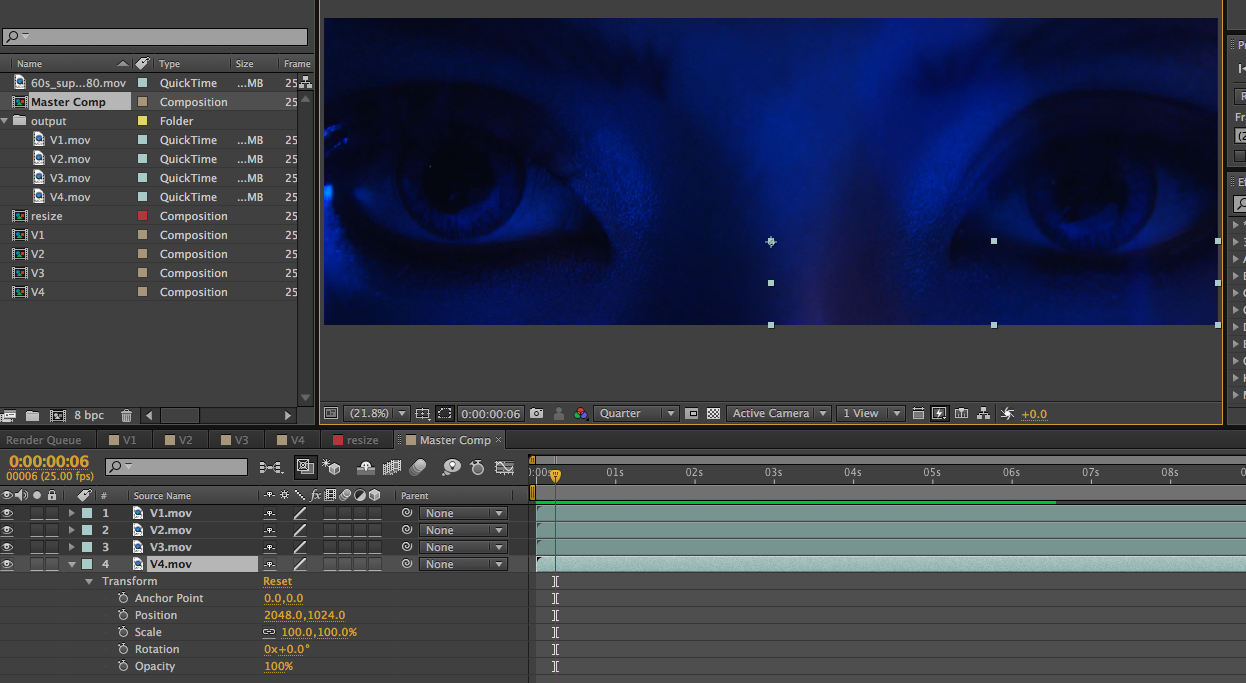
To check if the video has been cut fine, make a master comp of the full size (4096 x 1408 in this case) Import all the cut video exports (V1 - V4) into the master comp, re-set all the anchor points to 0,0 and re-set all the positions for V1 - V4 but without the negative

In this case it will be
V1 will be 0,0
V2 will be 2048,0
V3 will be 0,1024
V4 will be 2048,1024 (See pic 8)


Pic 8: Master comp 


All the videos should align correctly to give a complete picture, even if one pixel is off you will see the dividing line between the 2 images, play the video to check if there are any problems. If there is a problem go back and check all the numbers for each and every export and see if there is a problem there.

Step 9: Convert the video format.


Now you can convert the 4 cropped of videos into what ever format and compression you need, like most large screens require either wmv or mov as outputs. Don't forget audio file needs to be given separately.

Step 10: Check on the giant screen.


Finally if possible check the film on the giant screen to know that it all worked out fine.


For more interesting articles click on Auggielicious Index to see the list, and to be in touch hit Like / Follow on the blog button on the right hand side or hit Like on the Facebook page Auggielicious for information, latest news and events beyond the blog..


Thursday, October 22, 2015

Filmmakers Talk 14 - Director at PPM

Ever done referencing for something that has not yet been created...


Post your funny comments that you may have come across and it just might make it to the Film-Makers Talk List


Some past Talks:


*This is a work of fiction. Names, characters, quotes, places and incidents mentioned, either are products of the author’s imagination or are used fictitiously. Any resemblance to actual events or locales or persons, living or dead, from the film industry or outside the film industry is entirely coincidental.


For more interesting articles click on Auggielicious Index to see the entire list.
Like / Follow on the Facebook page Auggielicious for information, latest news, job posts etc..


Wednesday, September 23, 2015

Filmmakers Talk 13 - Agency Comments

Most recently came across this agency that asked me to zoom into the shot but without loosing any information.... Please help if anyone know how to do this..


Post your funny comments that you may have come across and it just might make it to the Film-Makers Talk List


Some past Talks:


*This is a work of fiction. Names, characters, quotes, places and incidents mentioned, either are products of the author’s imagination or are used fictitiously. Any resemblance to actual events or locales or persons, living or dead, from the film industry or outside the film industry is entirely coincidental.


For more interesting articles click on Auggielicious Index to see the entire list.
Like / Follow on the Facebook page Auggielicious for information, latest news, job posts etc..


Saturday, May 23, 2015

Filmmakers Talk #12 - Creativity Ends


Post your funny comments that you may have come across and it just might make it to the Film-Makers Talk List


Some past Talks:


*This is a work of fiction. Names, characters, quotes, places and incidents mentioned, either are products of the author’s imagination or are used fictitiously. Any resemblance to actual events or locales or persons, living or dead, from the film industry or outside the film industry is entirely coincidental.


For more interesting articles click on Auggielicious Index to see the entire list.
Like / Follow on the Facebook page Auggielicious for information, latest news, job posts etc..


Thursday, September 25, 2014

Teaser for Cadillac ATS


Watch in full screen.


Another challenge given to me earlier this year, Cadillac ATS was launching a new model and of course the teaser had to be out before the actual campaign was shot and delivered, so after a long chat with the agency we discussed to use the previous years footage, the givens were we cant show too much of the car since the model has changed and it says coming soon, it had to showcase from last years campaign the different locations that the car was shot at, also the different weather conditions basically everything from the challenges that were shot in the previous years, also had to include the human element, scale and production scale, and most importantly it will be only 15 sec long. Another problem faced was that all the earlier footage was shot in different formats so had to try and bind that in as well. The result is what you see above. Of course the last image of the car is the final car which is just a still image tracked on with the earlier shot car... let me know what you guys think..


For more interesting articles click on Auggielicious Index to see the list, and to be in touch hit Like / Follow on the blog button on the right hand side or hit Like on the Facebook page Auggielicious for information, latest news and events beyond the blog..      

Friday, September 12, 2014

Best compliment received from the client on Chevrolet Trax

One of the best compliments I have received from the client on this..

"What we require is the edit - A version, but after we saw this edit, we will go with this version" 


So earlier this year I was given this promo to cut, the brief given was to keep a liner story (a sort of cut down from the TVC) which I did make, on seeing the result I was not very kicked by it and it did not give me a feeling of a video that people would want to watch at a Autoshow.. So I sat with the editor and redid this edit.

The agency was a bit unsure of showing this version at first, since it was not what the client wanted but after a few viewings and a bit of convincing them that there is no harm in showing both versions.. they agreed to present both.

We presented both versions to the client, the first one edit - A, had everything from the brief and then we presented this version, all the clients present in the room had a long silence after they watched it and a little bit of discussion followed as to the positives and negatives of what they saw.. they ended with  "What we require is the edit - A version, but after we saw this edit, we will go with this version" 

I think that was one of the best compliments that I have received from the client, goes to show sometimes you just have to follow your gut and do it even though its not in the brief..


For more interesting articles click on Auggielicious Index to see the list, and to be in touch hit Like / Follow on the blog button on the right hand side or hit Like on the Facebook page Auggielicious for information, latest news and events beyond the blog..

Thursday, January 30, 2014

The story behind GEM Hospital's AD Series

The story behind GEM Hospital - a series of 4 commercials made in very very low budget.


One directors illness is another directors film.


One evening at 5 pm I get a call from a producer asking me what I was doing the next day,
"Free, but why?" I asked,
"Can you direct some AD films tomorrow?" he went on
Shocked for moment then all the questions flowed "What, Tom? Where? How?"

So the director who was to direct these AD's fell ill and the location, actors, DOP etc were all booked and advances paid in some cases would all be lost, so I got lucky. (In a very low budget film thats like all money spent) I asked for the scripts which was promptly emailed across to me and I read them, there was no treatment note or references, or any homework done by the previous director or if done were not shared and by this time it was 6 pm, with all the chat over the phone and the booking of tickets I was off to the Mumbai airport by 7pm for a 8:15 pm flight, still talking to the producer on route,  passing on a few instructions of things that could be done and with questions still flowing I was off to Chennai.

In all the confusion of trying to answer my questions, booking my tickets and making sure that I got to the airport on time the producer missed his flight, he was coming from Bangalore, luckily since the distance is not too much he caught a night bus to reach early in the morning, so much for our plans of meeting late in the night to discuss details. At least I got to meet the DOP and discuss with him the way he was looking at these films, I was still trying to get all the films clearly into my head to see which way I could treat these films the best.

At 6 am I finally met the producer, we had a short discussion where I learnt that the client was a friend of the producer and on his request was ready to invest a tiny sum to make a few commercials. We reached the location which I was having a look at for the first time, followed by the actors, briefed them along with makeup and choose the costumes (which were self owned options carried) Then along with the DOP made a shoot plan and and the rest is there for you to see.

4 commercials all shot in one day with a turnaround for shoot less than 12 hours (at least for me) These are my showreel versions, the client versions ran in theatres and a few cable channels in the south region of India. Do let me know what you think of them.

"Missed Call"


"Treadmill"

"Sweet Tooth"


*For some reason the last video has some glitches post upload in youtube, tried various exports so click on the link above to see in Vimeo.


For more interesting articles click on Auggielicious Index to see the list, and to be in touch hit Like / Follow on the blog button on the right hand side or hit Like on the Facebook page Auggielicious for information, latest news and events beyond the blog..


Thursday, December 19, 2013

Filmmakers Talk #6 Brief to Casting Director


Post your funny comments that you may have come across and it just might make it to the Film-Makers Talk List


Some past Talks:


*This is a work of fiction. Names, characters, quotes, places and incidents mentioned, either are products of the author’s imagination or are used fictitiously. Any resemblance to actual events or locales or persons, living or dead, from the film industry or outside the film industry is entirely coincidental.


For more interesting articles click on Auggielicious Index to see the entire list.
Like / Follow on the Facebook page Auggielicious for information, latest news, job posts etc..